Newsky, what to do first ?
What’s Newsky? What’s it for?
Newsky is a software that Manneken Fly uses to manage the airline and record all the flights made by our pilots.
Since we’re just starting out with Manneken Fly, we’ve decided to go for free software to get us started.
This page will explain how to use it and get you ready to fly for Manneken Fly!
Things Needed?
– Newsky
How to start with Newsky:
Step 1 : Downloading and installing Newsky
First, you will need to download and install NewSky.
To do that, just click here.
Then, just open the installer, wait and it’s done!
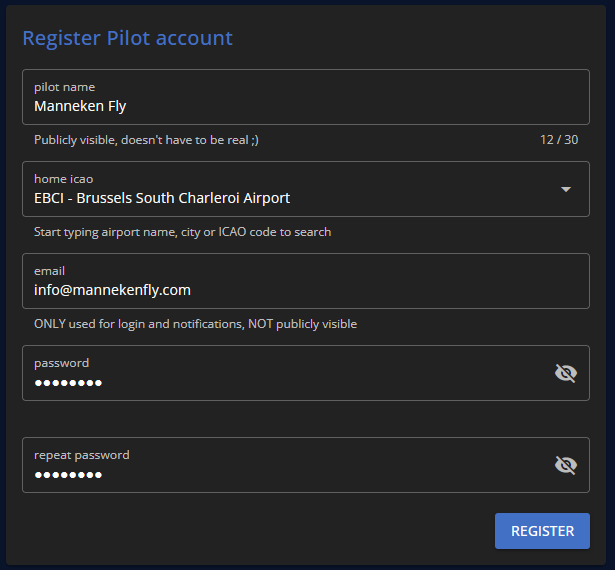
You will next need to create an account.
You have to fill the form with your informations.
We ask you to fill your real name as the “Pilot Name”. (But not necessarily the full name. It can be, for example, your first name and the initial of your last name.)
The “Home ICAO” must be the same as ours, i.e. EBCI.
After the registration, you have to verify your email adress and log in.
Step 3 : First steps
Newsky is using a detailled scoring system.
We recommand you to watch the video below to understand how Newsky is working.
We encourage you to take one or two flights (with the Newsky Academy Airline) before joining our airline to get used to Newsky’s systems and scoring.
Once you’re familiar with Newsky and your rating is above 7, you can join Manneken Fly.
To do so, go to the “Search Airlines” tab and search for “Manneken Fly”.
Once on the airline’s page, click on the “Join” button.
If you meet the requirements, a member of staff will accept you as soon as possible, and you can start flying with Manneken Fly.
And now … you’re done!
You can fly our with us, welcome.
Newsky introduction video :
Chek out the NewSky intro just below to lear how Newsky is working :
We encourage you to take one or two flights before joining our company to get used to Newsky’s systems and scoring.
If you need some help to join our airline or using Newsky, please feel free to contact us on our Discord.
See you in the sky and have a safe flight!